Spinbetter iOS
Welcome Bonus
For new players
+ 150 Free Spins
18+ only. T&Cs apply.
The Spinbetter iOS app lets players in Egypt play real-money casino games and sports betting directly from their iPhone or iPad. The app is built to give you instant access to betting markets, casino games, and promotions without needing a desktop device. The app download is available free of charge.
In this guide, we will explain how the app works and how to download it on an iPhone. We will also discuss the features Egyptian users can expect when using Spinbetter on iOS devices.

Instead, iOS users access the Spinbetter application through a Progressive Web App (PWA), which is added to the home screen using the Safari browser. This installation method allows the app to run almost like a normal mobile application.
To download SpinBetter and complete installating, the device must run a supported operating system and have a stable internet connection. The mobile app is designed to work on most Apple devices that run iOS 12.0 or later. It ensures stable performance for sports betting and casino activities.
The table below represents the basic requirements needed to install the app and start using the app without technical issues.
| Requirement | Details |
|---|---|
| Minimum iOS Version | iOS 12.0 or later versions. Devices running older software may not support the mobile application |
| Supported Devices | iPhone and iPad models that support iOS 12+ |
| Required Storage Space | The app runs as a PWA, so it requires a small amount of storage (10-40 MB) |
| Internet Connection | 4G and Wi-Fi |
| App Permissions | Yes, to enable notifications |
If your device meets these requirements, you can safely install the app from the official website.

Some of the major details you should know about are given below:
The Spinbetter app is downloaded from the official website, not the App Store.
The app can only be downloaded via the Safari browser.
The app works as a web-based mobile version of Spinbetter that behaves like a regular mobile application.
Egyptian players can download the app without special regional restrictions.
During installing, the app may request permissions such as notifications so players can receive Spinbetter offers, promotion alerts, and welcome bonus updates.
Downloading Guide
- 1Open Safari on your iPhone or iPad.
- 2Visit the official website.
- 3In the browser’s bottom menu, find the “Share” icon (a square with an upward-pointing arrow) and tap it.
- 4Find the section that allows you to download spinbetter for iOS.
- 5Select “Add to Home Screen”.
- 6In the top-right corner of the window that appears, tap the “Add” button
- 7Once installing is complete, the app icon will appear on your home screen.
How to Update the Spinbetter iOS
Keeping the Spinbetter betting app updated helps ensure stable performance and access to the latest features. Updates may improve the interface, fix minor technical issues, and introduce new Spinbetter offers or promotion campaigns.
Since the Spinbetter mobile app on iOS devices works as a web-based application added from the official Spinbetter website, updates usually happen automatically when the app reconnects to the platform servers. However, if the app does not refresh properly, users may need to reinstall it.
Registration via the App
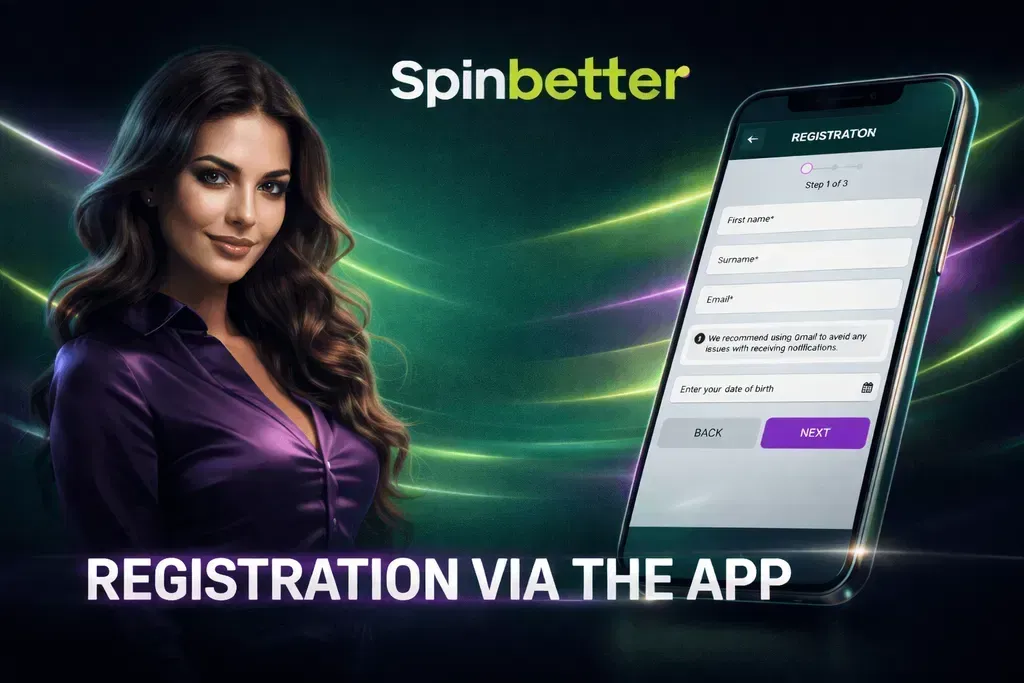
During th registration process, users can also enter a promo code. For example, new players can activate the PROMOGIFT code to increase their welcome bonus. They can also access additional Spinbetter offers available in the app.
Steps to register in the app:
- 1
Open the Spinbetter app on your mobile device.
- 2
Tap the Register button on the home screen.
- 3
Choose your registration method.
- 4
Enter the required details such as email address, phone number, and password.
- 5
Select your country and confirm your account information.
- 6
Enter a promo code in the dedicated field if you want to activate a promotion or welcome bonus.
- 7
Confirm the registration and verify your phone number if requested.
After registration is complete, log in and start using the app to bet on sport markets or explore the Spinbetter casino.
Log into an Account via the App
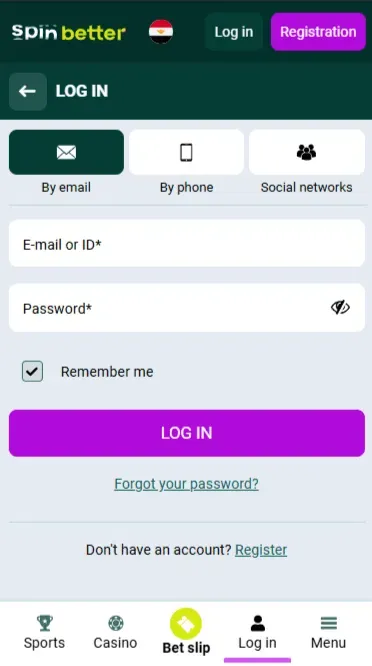
Existing users can access their accounts directly through the login section of the mobile application. When you open the Spinbetter mobile app, the login option appears on the main screen of the app interface.
Spinbetter iOS Features
The Spinbetter mobile application is designed to give players access to both sports betting and casino entertainment from a single mobile application.
Interface, Performance and Ease-of-Use
The Spinbetter app has an easy interface. Once users open the app, the top navigation bar allows them to switch between sections without reloading.

Sports and Casino in the App
The Spinbetter mobile app gives users full access to the bookmaker’s sportsbook and casino platform. Players can browse multiple sport categories, view odds, and place a bet on upcoming or live sporting event markets.
In addition to sports betting, the app includes access to the Spinbetter casino, where users can play slots, table games, and live casino titles from various providers. The app interface also includes search and filter tools that help players instantly locate specific casino games or betting markets.
Available betting and gaming options include:
Live betting on ongoing sport matches
Cash-out option for selected bets
Slots and other casino games
Table games such as roulette or blackjack
Live casino with real-time dealers

In addition to the sports and casino welcome packages, the platform regularly provides promotion campaigns, cashback offers, free bets, and free spins. Some Spinbetter offers are linked to betting activity, such as accumulator bonuses or cashback based on weekly losses. These bonuses can be viewed and activated through the promotions section available in the app.
Below is an overview of several popular bonuses offered on the platform.
| Bonus Type | Bonus Amount | Wagering Requirements |
|---|---|---|
| Casino Welcome Bonus | Up to 82,500 EGP across the first 4 deposits + 150 Free Spins | 35× wagering within 7 days |
| Sports Welcome Bonus | Up to 26,250 EGP across 5 deposits | 5× in accumulator bets with 3+ selections, odds 1.50+ |
| Casino Cashback (VIP Loyalty) | Cashback increases through 8 loyalty levels, starting from Copper level | None |
| Sports Cashback | 3% weekly cashback on lost bets | None |
| Loyalty Pays Off | Up to 17,613 EGP bonus + 100 Free Spins on the 10th deposit | 35× wagering within 48 hours |
| 75% Saturday Sports Bonus | 75% deposit bonus up to 10,000 EGP. | 3× wagering on accumulator bets with 3+ events and 1.5+ odds |
Mobile Version of the Website
Players who do not want to download the Spinbetter app can still access the platform through the mobile version of the website. The Spinbetter mobile site works well in any browser. By visiting the official Spinbetter website, players can log in, place a bet, and manage their accounts directly from their mobile device.
The mobile version of the platform is designed to adapt automatically to smaller screens. When users open the mobile site, the layout adjusts to display the sportsbook, the online casino, and account settings in a format suitable for iPhone and iPad screens.
Because it runs through a browser, the mobile site does not require storage space on the device. However, the Spinbetter app may offer a slightly faster experience and easier navigation because it loads directly from the home screen.
Mobile Site vs Spinbetter iOS App
Both the Spinbetter mobile app and the mobile site provide access to sports betting and casino features, but they work in slightly different ways. The table below shows the key differences between the two options.
| Feature | Mobile Website | iOS App |
|---|---|---|
| Installation Required | No installation needed. Access through Safari or another browser. | Requires download from the official Spinbetter website. |
| Performance | Depends on browser speed and internet connection. | Usually faster because the app performance is optimized. |
| Push Notifications | Limited account notifications. | Yes. |
| Storage Usage | No device storage required. | Uses a small amount of storage on the mobile device. |
| Updates | Updates automatically when the website reloads. | Updates automatically when the app refreshes. |

- SSL encrypition: The platform uses SSL encryption to secure the connection between the app and the platform’s servers. This technology protects sensitive information such as login details and payment data.
- KYC verification: Spinbetter also requires account verification to strengthen account protection. This helps ensure that only the account owner can access funds and betting activity.
- Responsible Gambling Tools: The platform also provides responsible gambling tools that allow players to monitor their activity and control their betting behaviour. In addition, deposits and withdrawals are processed through secure payment systems. It helps to protect transactions made through the app or the official website.
Spinbetter operates under an international gambling licence. This means the platform must follow established standards for fair play, data protection, and responsible gaming.
Pros and Cons
Pros
- The Spinbetter app uses SSL encryption
- Full access to all of the bookmaker's services
- Quick download
- The app requires a small amount of storage
- Push notifications
Cons
- Not available on the App Store
- You may need to reinstall the app if it starts running slowly
FAQ (Frequently Asked Questions)
Casino games can be accessed from the main menu of the mobile application. Navigate to the Casino section on the homepage. Inside this area, players can browse categories such as slots, table games, and live casino titles.
Yes, some Spinbetter app offers include bonuses that can be accessed without making a deposit. For example, the Telegram Bonus provides 100 free spins after subscribing to the official Telegram channel. While the Happy BETday promotion may award 20 free spins on a player’s birthday if the required conditions are met.
Yes, players can activate a promo code directly in the Spinbetter mobile app when using iOS devices. During registration, the app includes a dedicated field where users can enter a promo code such as PROMOGIFT. This code increases the welcome bonus by 30% for new players. If the code is not entered during signup, it may still be activated later through the account settings or promotions section of the mobile application.
Yes, players can manage both deposits and withdrawals directly through the Spinbetter app after verifying their profile. The payment section is accessible from the account menu within the mobile application. From there, users can choose a payment method, deposit funds, or request withdrawals after completing the necessary wagering requirements.
Yes, Spinbetter also provides a dedicated mobile application for Android users. It is designed to run on most modern Android smartphones and tablets that support recent versions of the Android operating system.