Spinbetter iOS App
Welcome Bonus
For new players
+ 150 Free Spins
18+ only. T&Cs apply.
Spinbetter, a name familiar to bettors, offers a stunning iOS app that will make your gameplay even more convenient and flexible. Once you become a user of the mobile platform, you'll definitely appreciate the improved graphics and high-quality live streaming. Thanks to optimisation for smaller screens, users can expect an excellent visual experience and user-friendly controls, making sports betting platforms even more popular. You can take advantage of the online operator's offer and download the Spinbetter app for iOS in seconds to start enjoying it right away!
System Requirements

To get a clearer picture of the Spinbetter iOS mobile app, and to ensure optimal performance along with stable, crash-free operation, you need to know the minimum system requirements.
| Requirement | Value |
|---|---|
| OS version | 10.0+ |
| Storage | 100 MB |
| RAM | 2 GB+ |
| Processor | Apple A9+ |

We've listed the main device options below to help you make your decision:
- iPhone 6S;
- iPad Air 2;
- iPad Mini 4;
- iPad Pro (1st generation);
- iPad (5th generation);
- iPad Pro (9.7 inches).
Installation Process
Step 1
- 1Don't go far—just find the "Download" button on this page. Click it to start downloading the file to your device.
- 2Once the file download is complete, select the "Share" option on the bottom menu bar of your Apple device.
Step 2
- 1Wait until you see a prompt on your screen to install the application on your home screen.
- 2Tap the "Accept" button to approve the process.
Step 3
- 1Open the downloaded application.
- 2Log in to your account or register.
- 3Set up your player account.
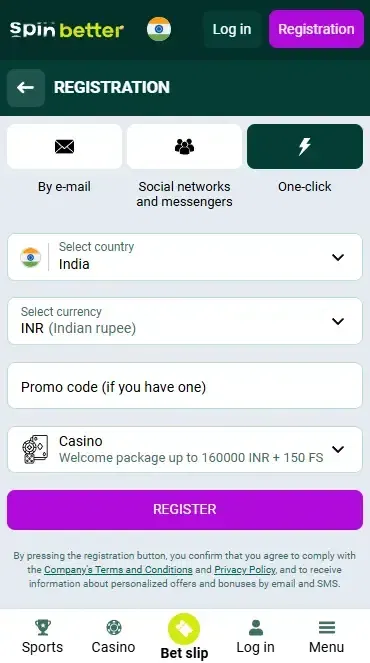
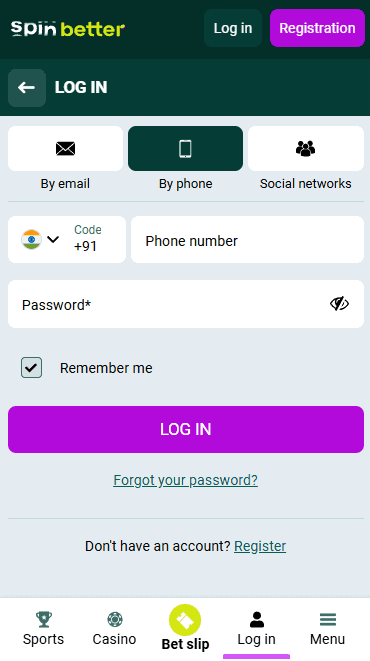
How to Register in the App
Spinbetter iOS App Features

Easy-to-understand interface. The app has an intuitive interface that allows iOS users to quickly and easily navigate between sections using the familiar functions of the device itself;
Offline access. Many games are available without an internet connection, making them more accessible;
Optimised performance. The app runs smoothly and quickly, minimising lags and ensuring instant page loads, which is especially important for those who are into live betting;
Instant feedback. The Snipbetter app gives users quick access to the support team, which is also ready to help customers by phone;
Data security. iOS provides better data management, allowing players to control which data can be used by the app;
Fast payments. Thanks to biometric authentication technology, the app allows transactions to be confirmed quickly and securely;
Live streaming feature. The ability to bet in real time and follow events in HD quality increases the player's chances of winning;
Updates. The bookmaker regularly fixes internal bugs and periodically introduces new features to improve the user experience.
Mobile version
The Spinbetter mobile site combines both the pros and cons of using portable devices. To help you make the right choice, let's take a look at the strengths and weaknesses of the mobile version of the betting web platform.
| Advantages of the Spinbetter mobile site | Disadvantages of the Spinbetter mobile site |
|---|---|
| Available without special installation | Limited opportunities for user interaction with the site, e.g., lack of notifications; |
| Updates automatically | Slower loading of images and text data |
| There is an option to copy a link to a specific page and share it | A stable internet connection is required for fast operation |
| Suitable for absolutely all users whose mobile devices have the option to access the internet | It's hard to personalise content |
Based on the data shown in the table, it can be concluded that the Spinbetter mobile platform has more advantages. Therefore, if you decide to use this version on your iOS device, follow the steps below:
- 1On the home screen of your smartphone, find the browser icon and tap it.
- 2In the search bar, enter the website address and tap the "Go" button.
- 3Use the side menu to navigate through the sections, and scroll up/down to explore the mobile site in detail.
- 4To log out, look for the "Log out" button in your Player Profile, then close the tab.
Pros and Cons
Pros
- Flexible customisation options;
- Ability to enable notifications;
- High-quality broadcasts;
- Enhanced security measures;
- Optimised performance.
Cons
- Rare updates.
FAQ (Frequently Asked Questions)
To find out which categories the Spinbetter mobile casino is ready to offer, find the relevant section in the bottom menu bar and visit it. You can also get more useful information by clicking on the link.
If you are a new customer of the betting company, we can offer you the promo code PROMOGIFT. To learn how to activate the bonus code on the bookmaker's website, you can do so here.
No, all options for applying promo codes are exactly the same and do not change depending on your mobile device model.